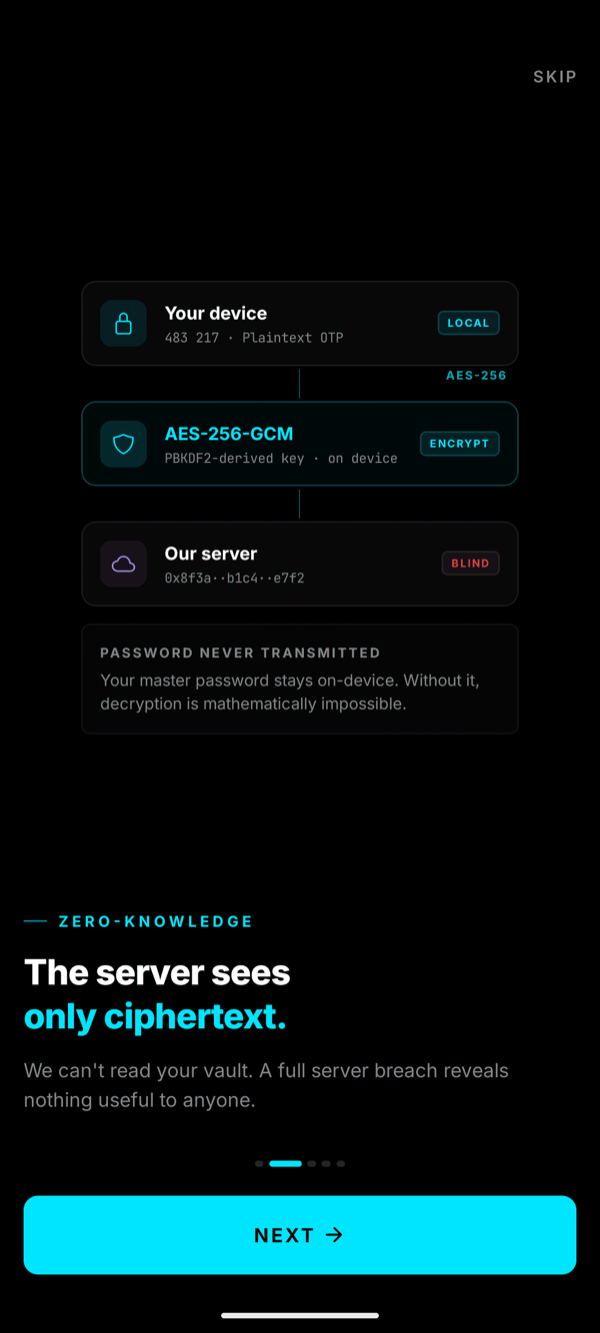
You set the password. Your device encrypts every 2FA secret with AES-256-GCM before it ever leaves. Our servers only see ciphertext — and neither can anyone else.
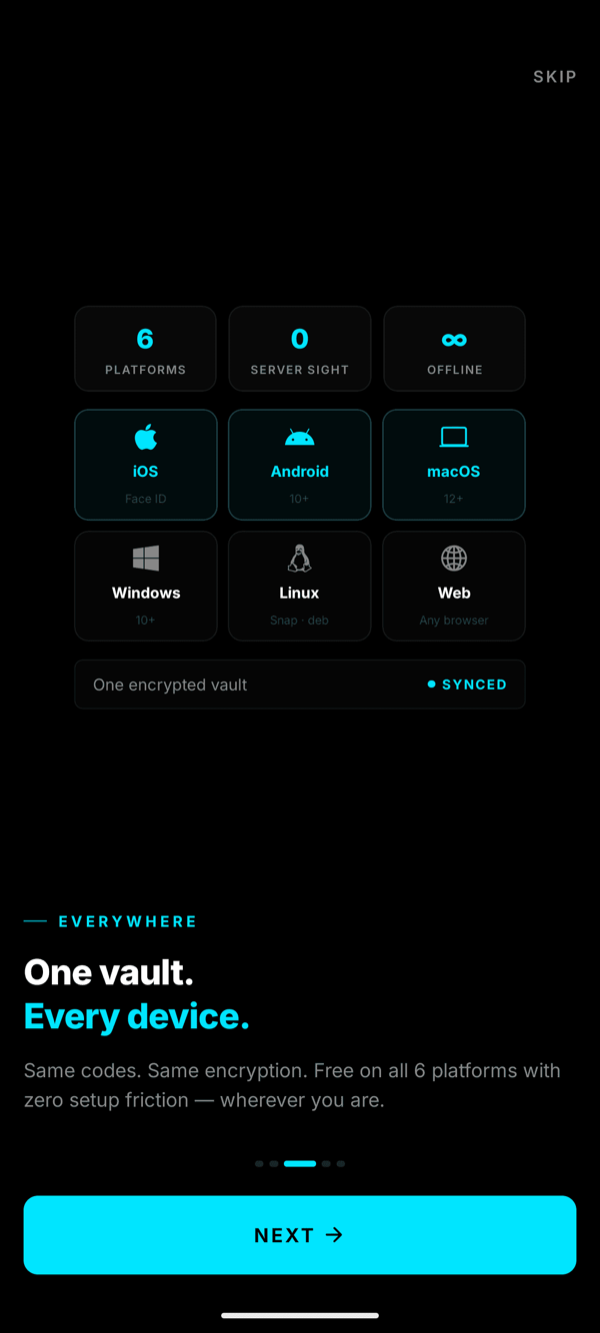
Same codes. Same encryption. Zero setup friction — anywhere you are.
Pocket
iOS · ANDROID
Face ID · Offline
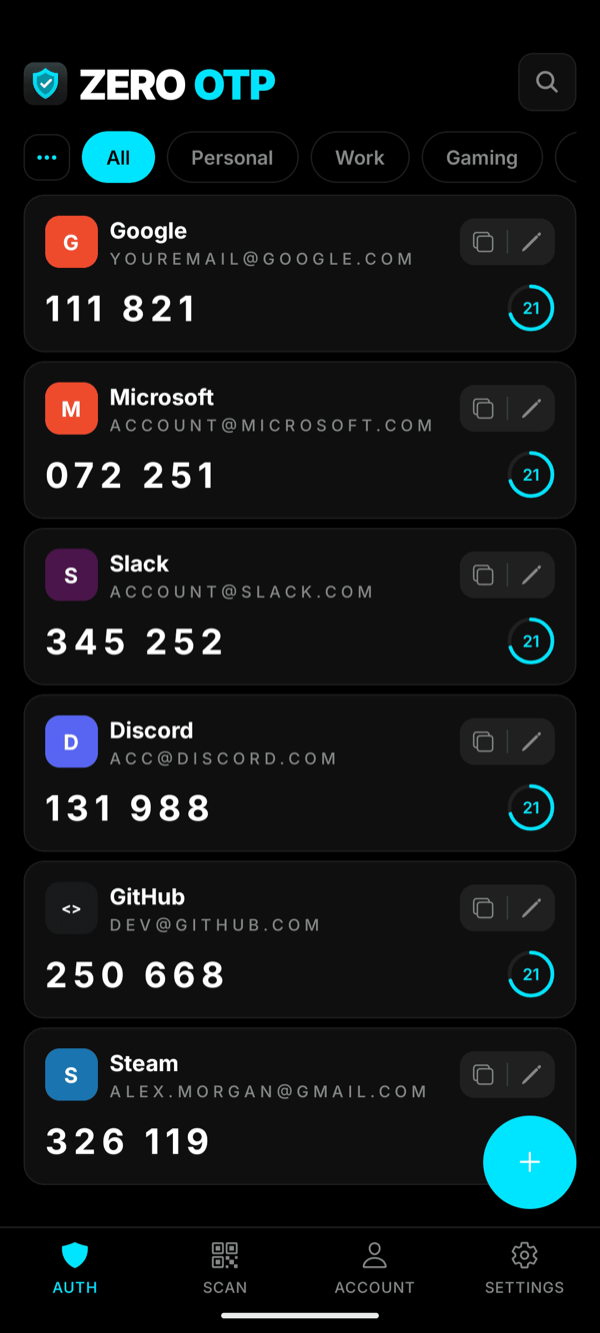
Native iOS & Android. Biometric unlock, haptic copy feedback, and a lock-screen widget that never shows codes in plaintext.
ZEROOTP
AllDev
GitHub2FA
418 902
Google2FA
203 114
AWS
AWS root2FA
891 337
₿
Coinbase2FA
672 059
iOS 15+·Android 10+·iPadOS 15+
Desktop
MACOS · WINDOWS · LINUX
⌘K·menubar
Keyboard-first client. Global hotkey, menu-bar access, grid view that scales to 200+ accounts. One keystroke to copy any code.
All · 42
Work
Personal
Crypto
Infra
GitHub
418 902
AWS root
891 337
Stripe
920 451
Vercel
337 088
macOS 13+·Windows 10+·Linux (AppImage/deb)
Coverage at a glanceHow ZERO OTP compares across platforms
vs. others
Platform
ZERO OTP
Google Auth
Authy
2FAS
iOS & Android
✓
✓
✓
✓
macOS
✓
✗
✓
✗
Windows
✓
✗
✓
✗
Linux
✓
✗
✗
✗
Web Browser
✓
✗
✗
✗
Zero-Knowledge Sync
✓
✗
✗
✗
FEATURES
Security is not a compromise.
Built around a single idea: your secrets should be unreadable to anyone but you — including us.
01 · CORE
Zero-knowledge encryption
Your device encrypts every 2FA secret before it hits the wire. Our database stores only ciphertext — we literally can't read it.
DEVICEPlaintext OTP
AES-256-GCM
PBKDF2-derived key
DATABASEUnreadable
Decrypt
on-device
OTHER DEVICEPlaintext OTP
Password never transmitted · same key, same vault, every device
02 · KEY
Master password, derived locally
You type a password. Your device runs PBKDF2-HMAC-SHA256 with 600,000 iterations to derive the vault key. We never see any of it.
input
••••••••••••
PBKDF2-HMAC-SHA256 · 600k
key
0x8f3a··b1c4··e7f2
Stays on your device. Always.
03
Works offline, always
Codes generated locally via RFC 6238. Never waits on a server.
ONLINE
OFFLINE · SAME
04
End-to-end encrypted sync
Vault flows between your devices as ciphertext. Only you can unlock it.
4 DEVICESSYNCED
05
Easy import
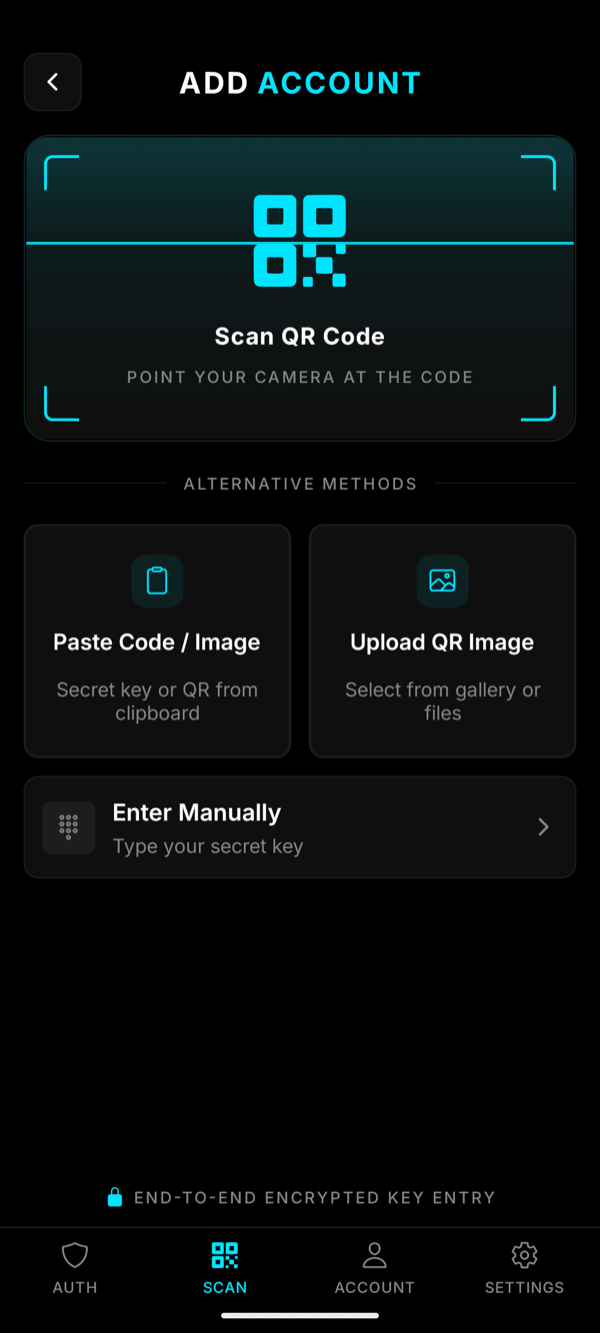
QR scan, otpauth:// paste, or import from a ZERO OTP backup file.
ZERO-KNOWLEDGE
HOW IT WORKS
The server never sees anything useful.
You set the master password. Your device derives a key from it locally with PBKDF2-HMAC-SHA256 (600k iterations),
then encrypts every 2FA secret with AES-256-GCM before any network call.
The server only ever stores ciphertext — without your password, decryption is mathematically impossible.
Password never transmitted
Your master password stays on your device. Only encrypted ciphertext crosses the network.
Ciphertext-only database
AES-256-GCM with authenticated tags — tamper-evident. A full server breach reveals nothing useful.
No recovery by design
Forget your master password? Nobody — not even us — can recover your vault. That's the guarantee.
Your device
password → PBKDF2 → key
LOCAL
483 217
Plaintext OTP · never leaves
AES-256-GCM encrypt
Server database
stores ciphertext only
BLIND
0x8f3a··b1c4··e7f2··a021··9bdf··cc4e
Without your password, this is noise.
Decrypt on-device
Another device
same password → same key
LOCAL
483 217
Same vault · unlocked, on-device
HOW IT WORKS
Three steps. Sixty seconds.
Set a master password once. Scan. Done. Your vault is live on every device.
01
SCAN
Scan any QR code
Works with every TOTP service. Accepts any standard otpauth:// QR code or URI.
02
ENCRYPT
Encrypted on your device
AES-256-GCM with a key derived from your master password via PBKDF2-HMAC-SHA256 (600k iterations). Happens before any network call.
03
SYNC
Instant on every device
Your encrypted vault syncs to all 6 platforms. Same master password unlocks it everywhere.
FAQ
Common questions.
Is ZERO OTP free?
Yes. Unlimited accounts, offline TOTP, on-device encryption and cross-device sync are all free. If premium features land later, the core security model stays free forever.
Which platforms are supported?
ZERO OTP runs on iOS, Android, macOS, Windows, Linux and the Web. The same encryption model and the same master password work across every one — you set up once and every device sees the same vault.
How do I sign in? Is there a password to log in?
No login password. You enter your email, we mail you a short one-time code, and verifying it returns a device token that's bound to your device. There's nothing for an attacker to phish or reuse — no static credential ever leaves your device.
What's the difference between sign-in and the master password?
Two different things on purpose. Sign-in (magic-link email code) proves you own the email and lets your device talk to the API. Master password never leaves your device — it derives the encryption key used to protect your OTP secrets. The server never sees it and can't help you recover it.
What does "zero-knowledge" actually mean here?
When you set a master password, your device derives a 256-bit key with PBKDF2-HMAC-SHA256 (600,000 iterations, per-user salt) and encrypts every TOTP secret with AES-256-GCMbefore it hits the network. Only the resulting ciphertext is stored on our servers. Your password, your derived key and your plaintext secrets never leave the device.
What happens if I forget my master password?
We can't recover it — that's the whole point of zero-knowledge. We never see it, so there's nothing on our side to reset. Your encrypted vault becomes unreadable. Pick a password you'll remember (a passphrase of 4–6 uncommon words works well) and keep a copy somewhere only you can reach.
What happens if I lose my phone?
Install ZERO OTP on a new device, sign in with a fresh magic-link code, and your encrypted vault downloads automatically. Enter your master password and everything decrypts locally. You can also revoke the lost device from Settings so its token immediately stops working.
Can I export my vault and leave?
Yes, any time — it's your data. ZERO OTP exports a plain-text JSON file containing your otpauth:// URIs so you can read it, copy individual entries, or import it into any other authenticator app. Everything happens on your device. No lock-in, no gatekeeping.
Does it work without an internet connection?
Yes. TOTP codes are generated locally per RFC 6238 — the app never asks the server for a code. A network is only needed to sync new secrets between your own devices.
How does sync between my devices actually work?
Every device polls a lightweight version endpoint (just an integer) a few times per minute. When something changes, it pulls the updated vault and decrypts it locally. With a master password set, only ciphertext ever moves across the wire.
Can I bring my accounts into ZERO OTP?
Yes. Scan any standard otpauth:// QR code to add accounts one by one, or restore from a ZERO OTP encrypted backup file to bring everything across at once.
Do you ever store the 6-digit codes?
Never. The rotating code is computed on your device from the encrypted secret + the current time. It's displayed, copied to your clipboard if you tap it, and forgotten — it never reaches our servers or any log.
Free to download
Start protecting your accounts today.
One master password. Zero server knowledge. Available on all 6 platforms.